OneClick for Pipedrive partners
OneClick will enable you to bring actual value to your customers.
It gives you custom buttons to start Make scenarios or Zapier workflows, or even open a separate modal window inside Pipedrive to show data from other systems.

What is OneClick?
OneClick was developed because we needed it our selves. It was obvious that triggering zaps and scenarios with a deal stage or data field change was not great. In addition, users had no idea if the automation even started, let alone if it was successful.
Creating custom buttons for customers was an obvious answer. Once we had that ability, we added more: you can also validate the data (all require fields are filled in and correctly), use disposable fields to ask extra information without having to add data fields, and ask for confirmation (are you sure?) to prevent accidental triggerings.
And also: the user gets feedback if the zap or scenario worked or not.
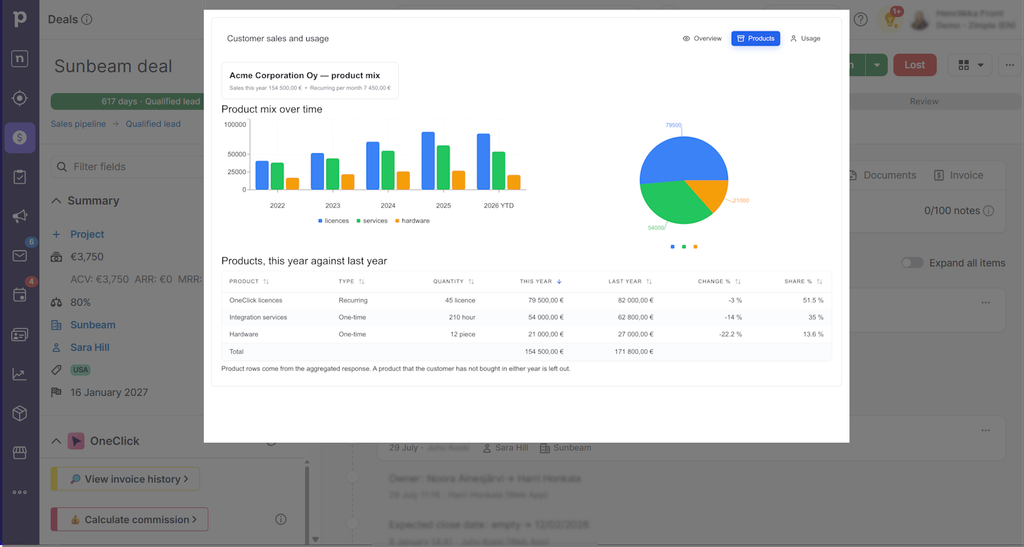
Now we are taking another huge step: The current version lets you build complete interfaces that open inside Pipedrive, directly on the deal, person or organization your customer is already viewing.
What is OneClick Interface?
Most partners already run customer automations somewhere. Interface Builder gives those automations the user interface they have been missing.
The pattern is simple. A form or button in the view sends data to a webhook. Your Make scenario receives the payload and performs the actual work: creating an invoice, checking stock, calling an ERP or writing data back to Pipedrive.
The scenario then returns a small JSON response. OneClick can display it as a notification, replace the submitted form with a message or move the user to another view.
A view can also retrieve data from a scenario. Point its data source to a Make webhook, and the response fields become available in the Data Picker alongside the Pipedrive fields.
How to build interfaces?
The best thing about the interface is: no front end coding needed!
OneClick has a very convenient block builder that will have all the elements you need to create any view the customer needs.
Combine different block types to create the exact view your customer needs. For a sales demo, you can also embed an AI-generated HTML prototype populated with Pipedrive or external data. This gives the customer a concrete preview of the proposed solution inside Pipedrive.

For Pipedrive partners
Extend what you deliver to your clients
We offer you a chance to resell OneClick with your current Pipedrive offering. As a OneClick partner, you can decide the pricing and bundle OneClick with your other services if you wish. We send you an invoice for the seats you have, no credit cards needed if you don’t want to.
If a customer from your region contacts us about using OneClick for their integrations and automations, we will also direct them to you.